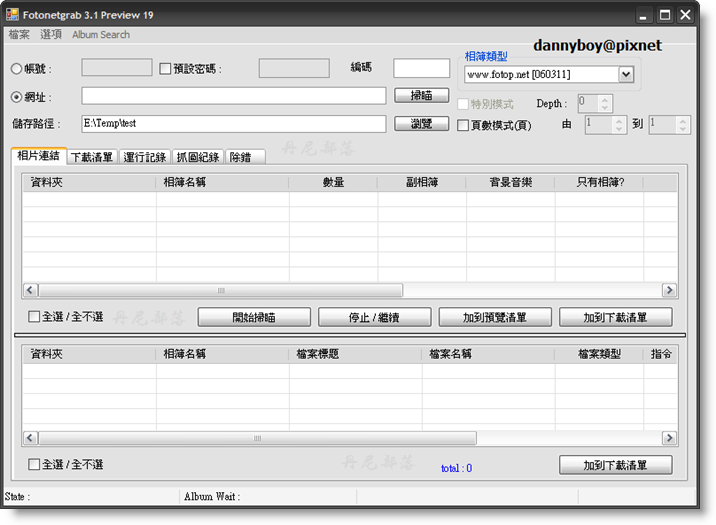
這是一款繁體中文的網路相簿下載器,支援的的相簿很多種,常見的都有:無名, Flickr, Picasa, PChome, Xuite, Pixnet ...,讓我們不用再一張一張瀏覽,再一張一張點右鍵存取了,整本相簿都很中意嗎?全部打包回去慢慢欣賞吧。
官方網站:http://hk.geocities.com/gacktt2001/index.html
載點【以配合置換官網latest exe build (.NET 2.0) @ 2008-04-22】

dannyboy 發表在 痞客邦 留言(0) 人氣()


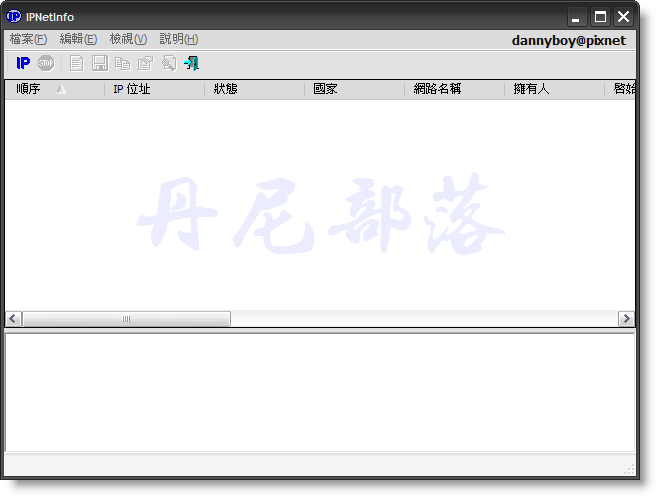
如圖所示,這軟體能查到 IP 的一些資訊(擁有人、國家、聯絡方式),官方網站說這軟體還能查出到底是誰在亂寄垃圾郵件,不過我想大家應該還是只用來偶爾查查某 IP 所在國家而已吧,不要用來做壞事喔(能做什麼壞事???)。
官方網站:http://www.nirsoft.net/utils/ipnetinfo.html
更新訊息:# Version 1.11:
* Fixed bug: The main window lost the focus when the user switched to another application and then returned back to IPNetInfo.
# Version 1.10:
* Added 'Show Tooltips' option.
* Added 'Show My Current IP Address' option - it automatically opens a Web page from NirSoft Web site that displays your current IP address. You can copy this address and paste it into IPNetInfo utility, and get all information about your IP address.
* The configuration of IPNetInfo is now saved into a cfg file instead of the Registry.

dannyboy 發表在 痞客邦 留言(0) 人氣()


最近到微軟的 Windows Update 發現有這項更新,本著好奇的心我安裝了,裝完後的感想其實還好,介面滿美觀的,但其實有裝過 Google Desktop 的應該都清楚這樣的模式,對我的實用性真的有限,但有需要這類的軟體的朋友能去安裝看看,對了,安裝後以後內建的系統搜尋都會預設跳出這個新版搜尋器喔。

微軟提供的 Overview :

dannyboy 發表在 痞客邦 留言(2) 人氣()


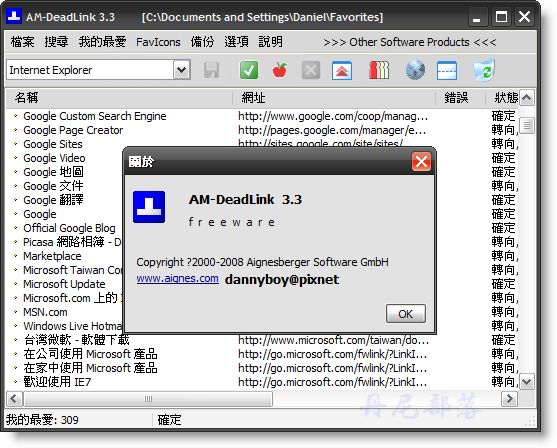
當我們要檢查一兩個連結的存活,很簡單,只要點進去看看網站還在不在就知道,但當我們 IE 裡頭的『我的最愛』和 FireFox 裡頭的『書籤』都已經幾十個、數百個了,要去檢查每個連結的存活再用這樣的方法可就吃不消了,因此就有了這款方便的檢查軟體,自動幫我們檢查所有『我的最愛』、『書籤』、或是自己收藏的連結。
官方網站:http://www.aignes.com/deadlink.htm
官方介紹:
AM-DeadLink detects dead links and duplicates in browser bookmarks and text files. If a bookmark has become unavailable you can verify and delete it permanently. Additionally you can download FavIcons for all your Favorites and Bookmarks.

dannyboy 發表在 痞客邦 留言(0) 人氣()


我們平時有時候因為懶得每次都要輸入密碼才能登入一些網站或站台,因此在瀏覽器網頁內部、MSN 登入畫面、FTP 站台等地方,總是讓軟體本身去幫我們記住這些密碼,平時照常登入倒是挺方便的,但萬一有一天我們需要看密碼時,這些星號『*』或『●』(密碼遮罩)便成了我們的障礙,利用這軟體能輕易讀取密碼。

官方網站:http://leelusoft.blogspot.com/

dannyboy 發表在 痞客邦 留言(12) 人氣()

Photobucket

所謂『批次』或『批量』重新命名,指的就是英文所說的 "batch" ,而批次命名軟體就是設計來幫我們大量的重新命名圖片、資料夾、音樂、影片等檔案,讓我們能快速、理想地重新命名。
官方網站:http://www.antp.be/software/renamer
官方介紹:
Ant Renamer is a free (really free, i.e. the source code is available) program that makes easier the renaming of lots of files and folders by using specified settings. It supports Unicode names.

dannyboy 發表在 痞客邦 留言(3) 人氣()

你是否也有想把自己所有密碼全部更改或定期更改、以增加自己資料的安全性,但又覺得記一堆密碼太麻煩的想法呢?那你千萬要試試這款軟體,功能很齊全,絕對符合一般使用者的需求。
官方網站:http://www.flyingbit.com/products/password_keeper/ 
官方介紹:
Practically any computer user comes across the problem of remembering a lot of confidential information. For example, it may include passwords, serial numbers and all kinds of codes. Alas, we are not always capable of keeping all that in mind. In these cases, people often use notebooks and, for example, files on the hard drive. However, this solution is not quite secure, moreover, it is dangerous. In case your notebook is lost or the file is copied, your personal information will be in someone else's hands.
FlyingBit Password Keeper offers a simple solution for all these problems. Data is stored in a special encrypted database. Thus, even if someone gains access to the storage, it will be impossible to read information from it. Due to reliable encryption algorithms, such as AES, Towfish and Blowfish, your password database is securely protected. To read the storage, you need the password that only you know. On the whole, it is easier to memorize one password than a dozen passwords.
FlyingBit Password Keeper allows you to create your database on a removable media with one click. It occupies minimum space and can work without installation. Due to this, all the necessary information is always at hand even if you work with another computer.
Main features: (官方英文+筆者翻譯加註)
Supporting various database encryption algorithms 支援多種加密運算法(我也不是很懂XD)
Grouping entries by categories 能依照種類分組
Automatically clearing the clipboard 定時自動清除在軟體內複製好的密碼
Copying the value of a field with one mouse click 單鍵(滑鼠中鍵)快速複製儲存的密碼
Supporting custom fields (照翻很怪)客製化的密碼儲存區
Storing notes 能儲存便條
Simple and clear interface 簡單清楚的介面
Comfortable navigation with the help of a tree-like list 樹狀結構式的導覽
Working with removable media 可在卸除式磁碟運作
Built-in random password generator 內建的隨機密碼生成器
Quick passcards search 快速尋找密碼
Supporting operating systems from Windows 98 to Vista 支援多種作業系統
(以上內容引自:http://www.flyingbit.com/products/password_keeper/
這個小軟體還真是不錯,不只介面簡單好看,
功能更是符合普遍大眾的需求,又有貼心的設計。
這程式能設定在開機自動啟動,
之後需要輸入任何密碼時,
只要打開縮小在系統列的小圖示,
選擇你已經儲存好的密碼,
點下滑鼠中鍵複製即可立即貼上,
預設複製好的密碼會在系統剪貼簿中刪除,
這樣能防止別人盜用,所以你的動作慢一點的話可能要再複製一次,
但當然預設的10秒也是能改的,
有時需要大幅更改密碼時總沒有頭緒,
這時還能用他內建的密碼產生器,
(能選需要幾個字元、大小寫、避免相似字元,還有貼心口訣教你怎麼記憶XD)
需要將這些密碼資料帶著走嗎,
沒問題,他還能在隨身碟上建立執行檔和專案檔,
當然還是有安全的使用密碼囉,
所以你要做的事就是安裝這款軟體然後記住一組密碼就夠了,
一起當個名符其實的懶人吧~
官方下載頁面:
Donload Page 
筆者親自上傳多種載點:(擇一下載即可)
(若有需宣傳下列載點請先告知筆者)
http://www.driveway.com/b1j5t1f3l9 

www.mybloop.com/go/VqT9FA 

http://www.mediafire.com/?nmsmwmzuydc 

http://tinyurl.com/6q3hc4 (4shared空間)

http://ppt.cc/ourK
(ADrive空間)

file hosted by www.badongo.com


dannyboy 發表在 痞客邦 留言(3) 人氣()


Yahoo 開發的輸入法,使用起來跟「新酷音輸入法」有異曲同工之妙,獨特的快速鍵查詢英漢漢英詞典相當方便,此外也具有相當貼心的顏文字符號表、注音文校正、簡繁轉換等功能。

官方網站:http://tw.download.yahoo.com/keykey/

dannyboy 發表在 痞客邦 留言(0) 人氣()

Photobucket

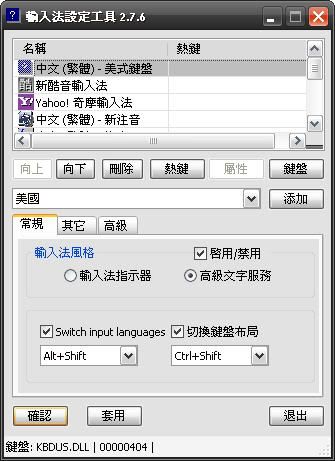
是不是對於常常在輸入時為了切換到自己習慣的輸入法而ctrl+shift按到手抽筋感到疲倦了呢?
試試這款軟體吧!
以下是我個人調整後的順序:

dannyboy 發表在 痞客邦 留言(3) 人氣()


這篇文章單純針對從無名小站轉址,需要的請進,無名愛好者就甭進來囉~
(此篇僅確定適用於IE7,其他瀏覽器未知。) (見補註)
補註

經底下#7的 f1207bill 網友通知,FF2 瀏覽器也能成功轉頁。
筆者也用 FF3 瀏覽器測試過了,能成功轉頁,但轉頁訊息跳出時間比 IE7 慢。

dannyboy 發表在 痞客邦 留言(31) 人氣()

Photobucket

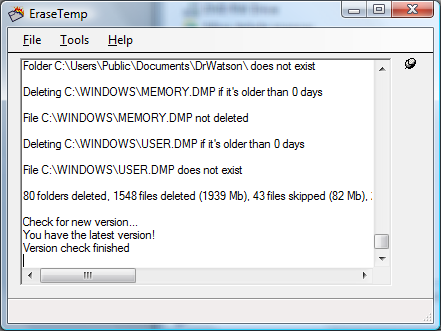
官方網站:http://www.nodesoft.com/EraseTemp/Default.aspx 
官方介紹:
EraseTemp is a utility that automatically deletes old temporary files from your computer.
(沒看錯,就只有一行)
程式作者的話:
After helping people with computer problems I discovered that many computers had a lot of old temporary files.
This wastes space on your hard drives and could be a stability problem.
One solution to this can be to just delete them in Autoexec.bat but some installations depend on files in the Temp directory to finalize an installation. A simple delete could make these apps to stop working. That’s why we started working on EraseTemp.
If you just run the application it deletes everything older than one day in the Temp folder(s).
It looks in you personal Temp folder in Documents and Settings, the Temp folder in the Windows folder and, if present, C:\Temp.
It also removes old dump files by default.
You can also use EraseTemp to delete old files, any number of days old, in any folder.

dannyboy 發表在 痞客邦 留言(1) 人氣()

Photobucket

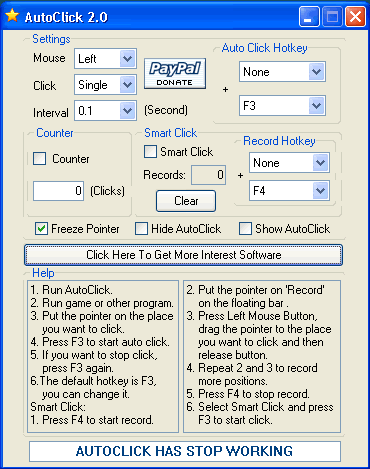
官方網站:http://goldensoft.org/ 
官方介紹:
AutoClick is a useful tool to automatically click mouse instead of hand. If you click mouse frequently when you are playing game or working, this application can release your finger and save your time. Only press one hotkey, AutoClick will help you finish click.
(以上內容引自官方網站)

dannyboy 發表在 痞客邦 留言(1) 人氣()

Blog Stats
⚠️

成人內容提醒

本部落格內容僅限年滿十八歲者瀏覽。
若您未滿十八歲,請立即離開。

已滿十八歲者,亦請勿將內容提供給未成年人士。