
CCleaner 能幫我們清除電腦裡大部分的系統垃圾和錯誤,他還能幫我們管理啟動時的程序、移除軟體,可說是短小精悍的清淨機,既然本身都是清淨機了,就別再為電腦帶來負擔了,使用這裡介紹的『免安裝版』吧,解壓縮後即可使用。
CCleaner 能幫我們清除電腦裡大部分的系統垃圾和錯誤,他還能幫我們管理啟動時的程序、移除軟體,可說是短小精悍的清淨機,既然本身都是清淨機了,就別再為電腦帶來負擔了,使用這裡介紹的『免安裝版』吧,解壓縮後即可使用。
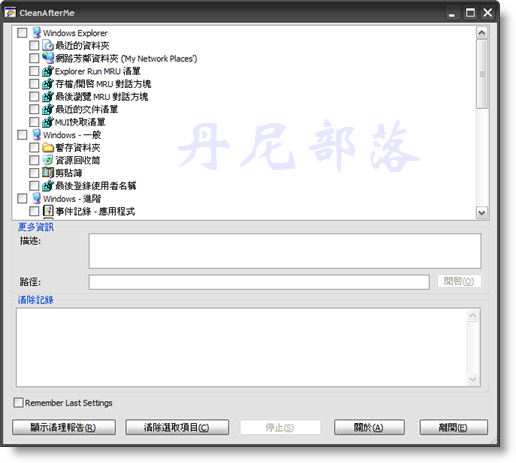
『CleanAfterMe』這軟體的名稱相當生動的形容了它的功用,他不但能刪除瀏覽器的暫存檔,還能刪除最近使用過的資料夾紀錄,以及一些很容易被查到你有動過該電腦的痕跡,這在幫我們收拾善後方面很有幫助,重點它包含繁中語系檔才小小56kb而已、又不需安裝,攜帶方便又實用。

官方網站:http://www.nodesoft.com/EraseTemp/Default.aspx
官方介紹:
EraseTemp is a utility that automatically deletes old temporary files from your computer.
(沒看錯,就只有一行 )
)
程式作者的話:
After helping people with computer problems I discovered that many computers had a lot of old temporary files.
This wastes space on your hard drives and could be a stability problem.
One solution to this can be to just delete them in Autoexec.bat but some installations depend on files in the Temp directory to finalize an installation. A simple delete could make these apps to stop working. That’s why we started working on EraseTemp.
If you just run the application it deletes everything older than one day in the Temp folder(s).
It looks in you personal Temp folder in Documents and Settings, the Temp folder in the Windows folder and, if present, C:\Temp.
It also removes old dump files by default.
You can also use EraseTemp to delete old files, any number of days old, in any folder.


 免費軟體 (22)
