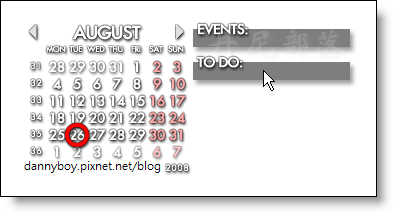
有時候我們總無法記住所有待辦事項、電腦是我們每天幾乎都要碰的東西、桌面也是凡開機必看到,因此何不利用這電腦桌面隨時提醒自己要辦的事情?在桌面顯示一個小型月曆以及代辦事項、能隨時新增項目和設定定時提醒,相信這款軟體絕對是現代忙碌的現代人必備的輔助工具。
官網:http://www.rainlendar.net/cms/index.php
更新訊息:
[2.6 Build 82] - 21 Aug 2009 - Version 2.6
o Windows with edit controls moved incorrect place on Linux if copy transparency was used. Fixed.
o The status field didn't work for Outlook tasks. Fixed.
o Some monthly recurring events which spanned across the year end were not shown correctly. Fixed.
o QuickAdd didn't always set the year correctly. Fixed.
o If "Disable keyboard shortcuts" is enabled the menu shortcuts are not shown in the context menu,
o Grouping events in the event list showed items twice if they defined a start time. Fixed.
o Added #DATE# as the substitute for the buttons in the lists. The substituted date is a string in format YYYYMMDD.
o Tooltips were not shown in the correct position for the url icons. Fixed.
o Alarms are removed from the events with RECURRENCE-ID property because they set as read-only.


註:
繁中語系檔安裝方法
下載主程式 (上面圖示),再下載繁中語系檔,按此下載。
先安裝主程式,再雙點擊執行 Traditional_Chinese.r2lang。
再執行桌面的Rainlendar圖示「Rainlendar2」,對日曆點右鍵,
選擇「Options」→「Language」→「Chinese」,
再重新啟動 Rainlendar Lite 即可成功更換為繁體中文介面。


 留言列表
留言列表


 免費軟體 (22)
